Excel to XML component
The Excel to XML component provides a way to select specific ranges of a Excel document and aggregate them together in a single XML body. Each Excel range can be specified by a single rule
Configuration
Each rule has the following configuration options:
Node name
Description
Each rule starts with a name. The data of the specified cell range will be wrapped in an XML node with this name.
Remarks
- Since it will be used in an XML element the following rules apply:
- Names can't start with a digit
- Names can't start with special characters like hypens or periods
- Names can't start with any variation of 'xml'
- Names can't contain special characters other than the period, hyphen, underscore, and colon
Worksheet
Description
Excel documents can contain mutliple worksheets. You have to specify the exact name of the worksheet from which the date of the cell range will be taken.
Cell range
Description
The cell range from which the data will be taken and wrapped into the specified XML node name.
Remarks
- You have to use contiguous cell series, for example
B2:B11. Single cells likeB2;B4;B6;B8;B10are not supported.
Transpose
Description
By enabling this option you can switch data from columns to rows, or vice versa.
Has header row
Description
By enabling this option, the top row of the rule's cell range will be used to name the child XML nodes.
Remarks
- Invalid XML characters will be filtered out from the header row values automatically.
- If
Has header rowis selected but that row has empty cells, those will fall back to the standard naming strategy.
Discard empty cells
Description
By enabling this option, cells without any value will not be added to the XML output.
Remarks
- When
Discard empty cellsis enabled and all cells in a row are empty, the full row will be discarded.
Actions
Every rule has some actions:
Add a new rule
The new rule is added below the current rule.
Duplicate a rule
The duplicated rule is added below the current rule.
Remove a rule
Example
This example spreadsheet:
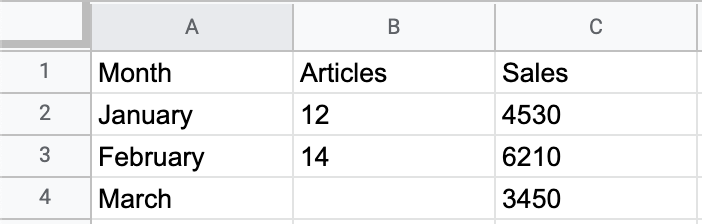
Combined with this Excel to XML component configuration:
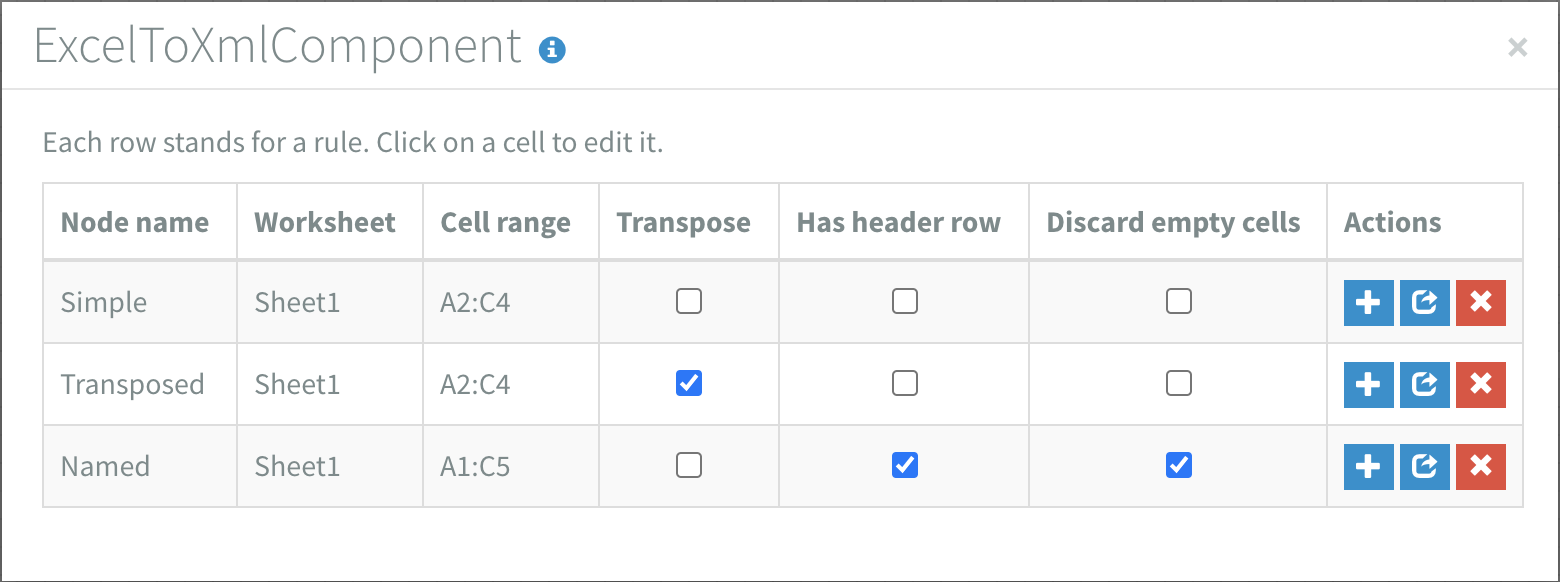
Will yield this XML:
<?xml version="1.0" encoding="UTF-8"?>
<Excel>
    <Simple>
        <excelRow>
            <cell colIndex="A" rowIndex="1">January</cell>
            <cell colIndex="B" rowIndex="1">12</cell>
            <cell colIndex="C" rowIndex="1">4530</cell>
        </excelRow>
        <excelRow>
            <cell colIndex="A" rowIndex="2">February</cell>
            <cell colIndex="B" rowIndex="2">14</cell>
            <cell colIndex="C" rowIndex="2">6210</cell>
        </excelRow>
        <excelRow>
            <cell colIndex="A" rowIndex="3">March</cell>
            <cell colIndex="B" rowIndex="3"/>
            <cell colIndex="C" rowIndex="3">3450</cell>
        </excelRow>
    </Simple>
    <Transposed>
        <excelCol>
            <cell colIndex="A" rowIndex="1">January</cell>
            <cell colIndex="A" rowIndex="2">February</cell>
            <cell colIndex="A" rowIndex="3">March</cell>
        </excelCol>
        <excelCol>
            <cell colIndex="B" rowIndex="1">12</cell>
            <cell colIndex="B" rowIndex="2">14</cell>
            <cell colIndex="B" rowIndex="3"/>
        </excelCol>
        <excelCol>
            <cell colIndex="C" rowIndex="1">4530</cell>
            <cell colIndex="C" rowIndex="2">6210</cell>
            <cell colIndex="C" rowIndex="3">3450</cell>
        </excelCol>
    </Transposed>
    <Named>
        <excelRow>
            <Month>January</Month>
            <Articles>12</Articles>
            <Sales>4530</Sales>
        </excelRow>
        <excelRow>
            <Month>February</Month>
            <Articles>14</Articles>
            <Sales>6210</Sales>
        </excelRow>
        <excelRow>
            <Month>March</Month>
            <Sales>3450</Sales>
        </excelRow>
    </Named>
</Excel>
Try it yourself:
Example spreadsheet
Remarks
- The symbols
<,>,&and“in Excel data will be replaced by<,>,"and'respectively. - Each formula will be transformed into a value. Formulas that result in a number
will by default have one decimal, but if there are more decimals you will get
the rest as well, for example
1÷3will result in0.333333333333333. - In order to handle huge XML-output it could be necessary to set a flow in synchronous mode. For example: a worksheet with 200.000 rows and 12 colums can create an XML output of 150 MB.