Designer Canvas
The canvas is the most important part of the Flow Designer. Each new flow starts with a blank canvas on the Route tab where you design your integration. The Error Route tab is also a canvas where you can design the error handling of your integration.

Designing your flow
You can start designing your flows by dragging components from the Component Library on the left and dropping them on the canvas. When you do this, you may notice that the component turns red, which is caused by validations. These validations are explained on the Flow Validation page.
Configuring components
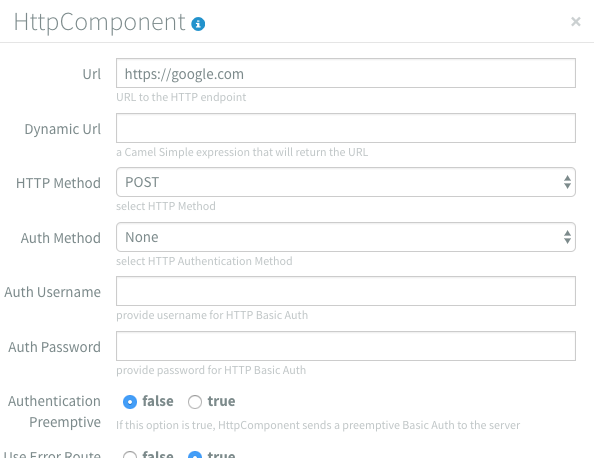
Almost all components have properties that must be configured, although some are optional or have default values. These properties can be accessed by double-clicking on the component or by hovering over the component and clicking on the gear icon.

Clicking the gear icon or double-clicking the component will open a dialog with all available configuration options for the component.
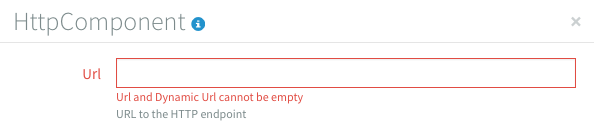
When a property is invalid it the input becomes red and an error message is displayed.
All property inputs have a small helper text that provides more information. For a full explanation of the component properties, you can click the i icon at the top of the properties view. It will redirect you to the documentation of the component.

Connecting components
Components can be connected to each other by dragging from one connector (the big blue sphere) to another. An arrow displays the direction in which the data will flow. For example, dragging from the Inbound HTTP component to the Email component allows the output of the Inbound HTTP component component to serve as input for the Email component. Note that some components cannot be used as either a first or a last component in a flow, depending on it’s characteristics.

Components can be consumers (receive data), producers (send data), or both, depending on their properties. Components that can consume data will have a connector on the right side of the component, and producers will have a connector on the left side of the component. Components that can both consume and produce data have connectors on both sides of the component.
Adding notes to components
Integration flows can become quite complex, so to make them easier to understand for yourself and others you can add notes to each component. To add a note you hover over the component and click on the note icon.

A new dialog opens that contains a text box for your component note.

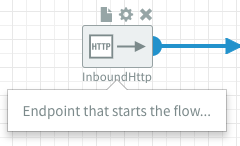
After adding a note to a component, a summary of that note will be shown when you hover over the component.
Copy and paste components
It is also possible to copy and paste components. This can be done in two ways. One is using key shortcuts and the other is by using the context menu. Both ways start by selecting the components using right click.

The components get a blue color when they are selected.
Copy and paste using key shortcuts
To copy selected components using keyboard shortcuts, you can use CTRL + c or CMD + c depending on your platform. When the selected components are copied, you will see a message confirming this. Now that they are copied, you can use CTRL + v or CMD + v to paste them. They will be pasted below the original components. It is possible to paste them more than once if necessary.
Copy and paste using the context menu
To copy selected components using the context menu, you can right-click on the Flow Designer canvas and select the copy action. When the selected components are copied you will see a message confirming this. Now that they are copied, you can use the context menu to specify where on the canvas you want to paste the components using the paste action.
Combining both ways of copy and paste
Both methods can be used together, for example, you can copy the components using keyboard shortcuts and then paste them to a specific location on the canvas using the shortcut menu.
Removing components
If you want to remove a component from the flow, you can hover over the component and click on the cross icon. If the component is connected to other components, the connections will be removed.

Error Route
Managing and recovering from errors is a critical concern for any enterprise system. Dovetail addresses this concern directly: every flow has an Error Route with a FailedExchange component. All failed exchanges from a flow are routed to this FailedExchange component.
Additional information about errors, referred to as exceptions, can be retrieved from these failed exchanges. You can create a flow within the Error Route to log, monitor, and/or report these exceptions. Additionally, you can create a flow to handle failed exchanges functionally.
Exceptions originating in the Error Route are only shown in the Flow logs. They are not handled by the FailedExchange component in the Error Route to prevent infinite loops. The typical use case for error handling in the Error Route should be simpler and less error-prone than for regular flows.
Refer to our Using exceptions guide for a full reference on exceptions and the expressions to retrieve them from a failed exchange.