FLV component
The FLV component allows you to parse a file containing fixed-length values (FLVs) into XML.
Each line that you want to include in the XML output is defined by a rule, and each rule can be further specified with fields. Any number of rules and/or fields can be defined.
Configuration
Each FLV component rule has the following configuration options:
Matching text
Specify lines to include in the XML output. Lines that start with exactly this text will be matched.
Group
Specify lines to group. Lines flagged as groups mark the beginning or end of a series of related lines. These lines will be enclosed in a group tag in the resulting XML.
Please use UTF-8 encoding for the incoming message. Add an Encoder component before the FLV component to change the encoding of the incoming message to UTF-8. You can add an Encoder component after the FLV component to change it back to its original encoding if necessary.
Field configuration
Each rule can be expanded to reveal the fields it maps to. Each field mapping chas the following configuration options:
Field
Specify the name of the field, this is reflected in the name of the XML node.
Length
Specify the length of the field.
Using FLV
See the example configuration below.
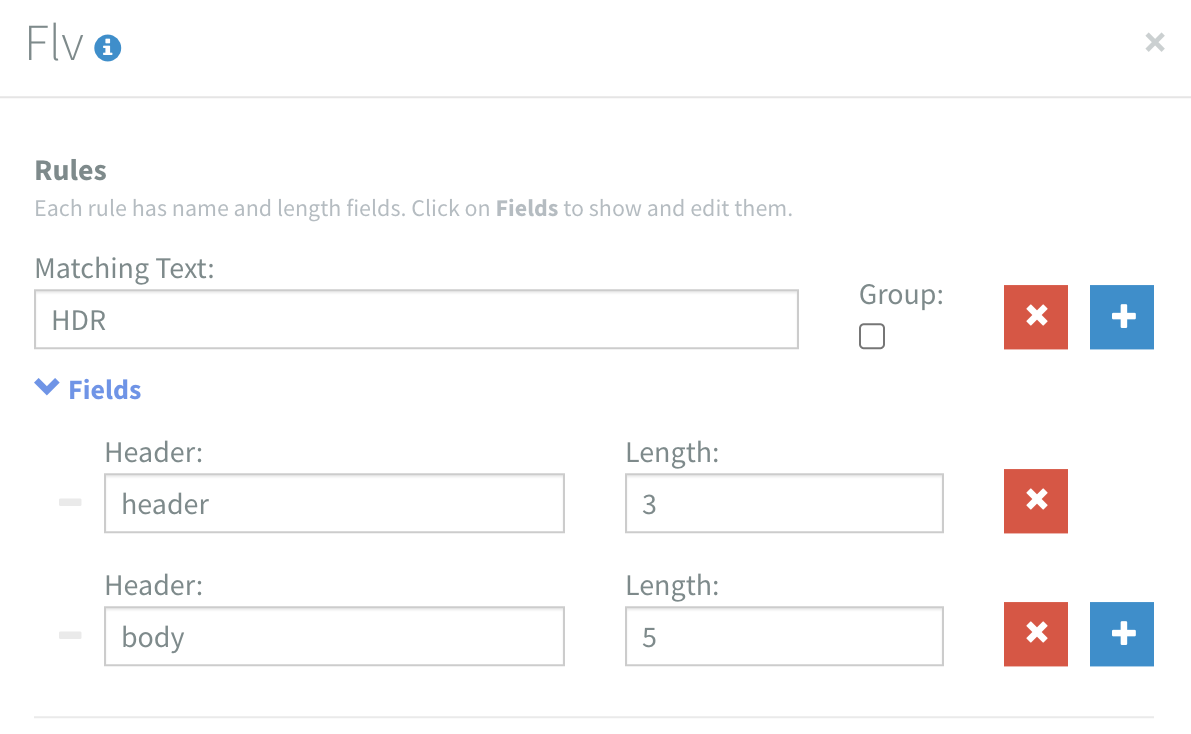
- FLV Input
- XML Output
HDRthing
<flv-message>
  <rule matchOn="HDR" fields="header[3]body[5]" />
  <segment>
    <header>HDR</header>
    <body>thing</body>
   </segment>
</flv-message>